Get started
Sign in: your email, Google or a Solana wallet
“Sign in” opens one window where you sign in with your email, your Google account or a Solana wallet. You need to sign in to launch a token, trade and collect what you earn. To play, you do not.
The site is in English. Button and label names are quoted here exactly as they appear on screen.
How to use it
-
Press “Sign in”
It sits at the top right of every page. The window “Sign in to Elixir Games” opens with three ways in: an email field, “Google”, and “Continue with a wallet”.

On a phone, “Sign in” sits between the flask and the pink “+”. 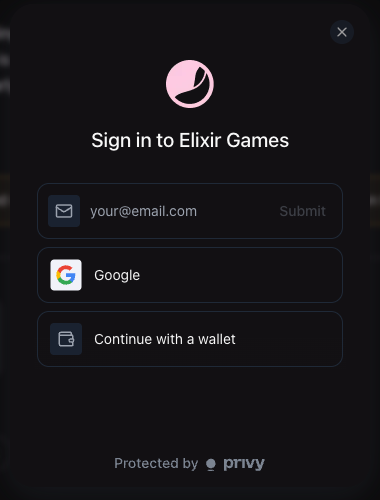
One window for every way in. -
With your email or Google
Email: type your address, press “Submit”, then type the code that arrives in your inbox. Google: press “Google”, finish on Google's own sign-in page, and you come back signed in. Either way you get a Solana account of your own, made for you: there is nothing to install.
-
With a wallet you already have
Press “Continue with a wallet”. The window shows “Select your wallet”: the wallets installed in your browser first, then Phantom, Solflare and Backpack. Pick yours, and your wallet opens its own window to connect, then asks you to sign a message that proves the wallet is yours: “Prove you own this wallet on Elixir Games.” Signing that message moves no money, and it works whichever Solana network your wallet is set to. To buy or sell here, set your wallet to devnet, the test network this version runs on. If you close the message without signing, your wallet stays connected but not signed in: press your address in the top bar, then “Sign in” in the window that opens.
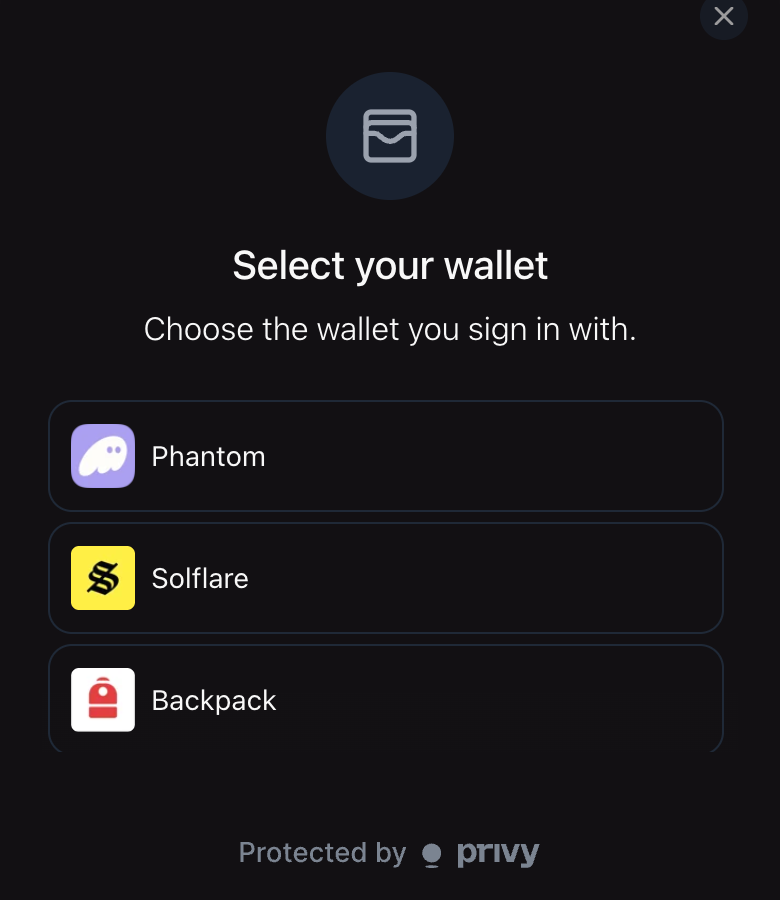
“Select your wallet”. To go back to email or Google, close it with ✕ and press “Sign in” again. -
You are in
The top bar now shows your address, shortened. Press it to open your account. Under “Wallet” you find “Your address” with “Copy address” and “View on explorer”, and your balances. At the bottom of the account window, “Sign out” (or “Disconnect” for a wallet) signs you out, and “Close” closes it.
-
Sign in the same way every time
Your games, your launches and your trading fees belong to the address you signed in with when you launched. Sign in the way you did to launch, and the games you launched appear. Another email or another wallet is another address, with none of your games on it.
-
Playing needs no sign-in
Press “Play” on any game and your browser plays as a guest, with its scores kept in that browser. A leaderboard asks a guest to “Sign in to keep what you earn”. Sign in on that page, and the score this browser has already earned comes with you.
Where the site asks you to sign in
Wherever a step needs your address, the page says so, and the button under it opens the same window. For example: “Sign in to launch.” before a launch, “Sign in to trade.” on a token's buy and sell panel, “Sign in to see the games you launched” on your creator dashboard, and “Sign in as this game's creator.” before you collect your fees.
What it does not do (yet)
- Solana wallets only. Ethereum wallets do not appear in the window.
- A phone's wallet app does not open from the window. In a phone's browser, sign in with your email or Google instead.
- A guest owns nothing yet. A guest can play, but cannot buy, sell, launch or collect: those need you signed in.
- When something fails, the site says so. If the window cannot load, you see “Sign-in is unavailable right now, so reload the page to try again.” with “Reload”. If your account is not ready in time: “Your account could not be set up. Try again.” If a wallet does not answer: “Your wallet did not connect. Unlock it, then sign in again.”